
Assessment & Policies: Evaluating Generative AI Tools for Use in Higher Ed
Authors: Electra Enslow (University of Washington) and Norman Lee (University of Idaho)
This lesson aims to help librarians assess AI tools their institutions are thinking about adopting, as well as tools they have already adopted and wish to monitor. Since a lot of assessment is project dependent, this module strikes a balance between discussing other institutions’ experiences with AI—which may or may not apply to a reader’s institution—and providing an overview of the concepts/tools institutions frequently use to assess AI. Readers are then free to pick and choose which are most appropriate for them. To make the material more concrete, it concludes with some suggestions about how to pick and choose, as well as mini-assessment example.
Recording and Materials
In This Lesson
- More Reasons to Care About Assessment
- Common Assessment Concepts
- Picking Which Assessment Concepts To Use
- Rubrics
- Comparing Ollama and ChatGPT for Library Use
- References
- AID Statements
- Footnotes
More Reasons to Care About Assessment
The previous modules demonstrate that AI tools are not a panacea and should not be adopted uncritically. Each institution is unique, so any AI tool should be assessed on those merits. However, there is some preliminary research on how successful AI adoption tends to be, which can provide useful context when deciding how much effort to put into assessment.
Systematic studies of AI adoption in academic libraries are rare. However, broader analyses done by McKinsey & Company (2025), MIT’s NANDA lab (Challapally, Pease, Raskar, & Chari, 2025), and Harvard Business School (Dell’Acqua et al, 2026). provide broader analyses, including “Knowledge workers” that could apply to libraries. For example, despite much discussion, they find that only ~5–7% of institutions have formally, systematically integrated AI into their workflows. ~80% of individuals experiment with or regularly use AI, but enterprise-level adoption is rarer, often failing at the pilot stage. ~60% of institutions have at least investigated or experimented with enterprise tools, however only ~20–30% move to pilot them. This can be due to:
- Difficulty adapting AI tools to existing workflow, or vice versa
- Lack of interest/investment by leadership
- Poor user experience
- Model output quality concerns
- Unwillingness to adopt new tools
On the other hand, organizations which successfully adopt AI tools tend to have the following characteristics:
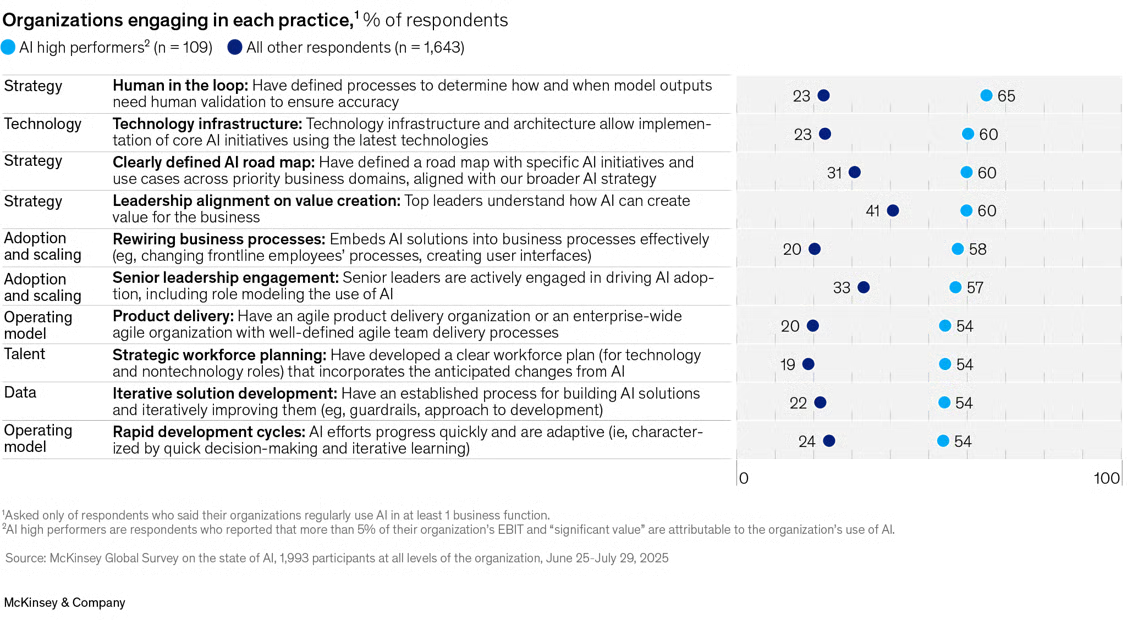
Of those that do adopt AI, 39% believe AI quantifiably decreased costs, usually by 10% or less. However, they also report qualitative improvements in things like innovation, customer/employee satisfaction, and cost, noting that because AI tools are integrated into larger workflows their specific effects can be difficult to tease out.
Common Assessment Concepts
For those who wish to adopt generative AI tools, there is no one-size-fits-all approach to assessment. Below is a list of common assessment concepts. It can be overwhelming, but remember that not every priority will be relevant for every product and, in many cases, a vendor or external partner may have already taken care of one or more points. Below the list are some general guidelines on how to determine which concepts are appropriate for an institutions’ use-case and how they should be weighted relative to one another.
AI Performance Concepts
These concepts cover how the AI performs as a standalone tool, not taking into account whether it fits any institutions’ specific policies & procedures.
To make each concept more concrete, they include examples of how they might be applied to three different generative AI programs, a chatbot (like ChatGPT), a coding agent/assistant (like Claude Code), and an AI assisted information retrieval (aka, RAGs like Consensus or Elicit).
- Accuracy - How frequently does the tool produce true or correct outputs? Examples:
- Relevance - How well does the model’s output address the task?3 Examples:
- Chatbot: how well does the chatbot answer the query provided?
- Coding agent: how frequently does the code it produces do what is required?
- RAG: what is its precision?4
- Linguistic fluency - How grammatically correct, readable, and consistent in tone and style are the outputs? Examples:
- Chatbot: is the output intelligible, easy to understand?
- Coding agent: is the code human readable, linted, and/or commented if necessary?
- RAG: is the information retrieved intelligible and synthesized to answer the query?
- Robustness/reliability - How consistently does the model perform across all potential inputs?5 Examples:
- Chatbot: Does the bot provide similar answers to similar questions? What types of questions is it good at answering?
- Coding agent: How frequently does the code produced work?
- RAG: Do similar queries retrieve similar results? Does it signpost limitations/gaps in its knowledge-base?
- Inclusion, equity, and linguistic/cultural diversity - Are the outputs of an AI tool biased towards the preferences of one or more groups? Does the performance of the tool depend on inputs being formulated according to the preferences of one or more groups? Examples:
- Safety - How well does the model avoid producing content that is inappropriate, offensive, or harmful?8 Examples:
- Chatbot: does it ever emit personally identifiable info (PII)? Help with illegal/unethical actions? Insult or belittle the user?
- Coding agent: What are the agent’s permissions? Does it generate security-conscious code?
- RAG: has the RAG’s knowledge base been sanitized? If not, does it monitor what’s presented?
- Human alignment - How well does model output align with human values, preferences, and expectations?9 Examples:
- Chatbot, RAG, & coding agent:
- Is the tool easy to use and manage?
- Do humans remain accountable for important decisions and oversight/management of the tool?
- Does it help users do more meaningful work?
- Chatbot, RAG, & coding agent:
AI Integration Concepts
These concepts cover how easy/hard it is to integrate the tool into existing policies & procedures, monitor it, and make any necessary changes, regardless of how well the AI tool performs.
- Cost - How much time and money will the tool require?10 Examples:
- Chatbot, RAG, & coding agent:
- Is the tool locally hosted, or purchased?
- Does it save time?
- What ongoing maintenance, data management, etc. are required?
- What is the estimated usage, in terms of users and/or tokens?
- Chatbot, RAG, & coding agent:
- Promotion/preservation of human agency - Does the tool augment or diminish user skills and abilities? Does the tool ensure humans remain accountable where appropriate? Examples:
- Chatbot: Can the tool take on the role of a collaborator and/or mentor?
- Coding agent: Does the tool explain its code modifications or provide reasoning traces? Does it ask users for permission to perform important tasks?
- RAG: Does the tool provide information about the scope of its knowledge base and a variety of search strategies?
- Transparency/Observability - Is the tool’s architecture inspectable and understandable? Are any reasoning traces, logs, metrics, etc. stored and available?11 Examples:
- Chatbot: Are reasoning traces available to the user? Are they stored for further analysis by administrators?
- Coding agent: Does it integrate with version control systems? And does that include the operations of the agent itself, in addition to the files being operated on?
- RAG: Is the search strategy transparent to the user? Is it easy to distinguish which information is sourced from the knowledge base vs. the model itself?
- Customizability - Is the tool’s architecture modifiable? If so, how easily? Examples:
- Chatbot: Can users or administrators modify important parameters like temperature, top p, top k, context length, model used, and reasoning allowance?
- Coding agent: Can the agent call other tools (e.g., make web searches, manipulate excel files)? Are permissions modifiable?
- RAG: How is the knowledge-base managed?
- Human alignment12 - How well does model adoption, use, and assessment align with human values, preferences, and expectations? Examples:
- Chatbot, RAG, and coding agent:
- Is the tool easy to use and manage?
- Do humans remain accountable for important decisions and oversight/management of the tool?
- Does it help users do more meaningful work?
- Chatbot, RAG, and coding agent:
Picking Which Assessment Concepts To Use
Hatton (2008) summarizes four common methods of prioritizing software requirements.
First, a simple ranking method, where requirements are ordered 1…n with one being the most important and n being the least. This may only be appropriate for cases with ~7 priorities because humans are limited in how much information they can process simultaneously.
The MoSCoW method sorts priorities into four groups:
- “must haves” - non-negotiables. The project doesn’t work without them.
- “should haves” - features to include if at all possible, but not absolutely necessary.
- “could haves” - things that would be nice to have
- “won’t have” - also known as a “wish list”, things that definitely won’t be implemented in the initial version of the project.
The $100 method asks decision makers to split $100 between all their priorities, with higher priorities getting the most money. If there are no clear, standout priorities, a second $100 can be split but only in one pile of $50 and two piles of $25, which forces decisionmakers to select “standout” priorities when things are equivocal.
The Analytic Hierarchy Process (AHP) compares each requirement to every other requirement (accuracy and relevance, accuracy and safety, etc..), picks the more important priority within each pair (e.g., safety is more important than accuracy), and assigns a number between 1 and 9 to how much more important (e.g., 1 - safety is barely more important than accuracy; 9 - safety is extremely important compared to accuracy). Weighted scores for each priority can then be calculated.13 If decision makers are attempting to choose between 2 or more AI tools, rather than how to build/adopt a single one, each tool must be compared to each other tool on each of the priorities.14 Hatton suggests AHP only in larger, complex projects with potentially conflicting priorities.
Rubrics
Using a rubric, especially if you are discovering new tools and workflows, can give you a clear criteria such as accuracy, privacy, usability, cost, integration, or compliance and lets you compare tools side‑by‑side using the same standards. Additionally, a good rule of thumb in assessing is to follow the money. How are they using your information? Are they incorporating advertising in their output? This is more prevalent in OpenAI systems but always read the user agreements.
The following rubric from the Academic Senate for California Community Colleges (ASCCC) is highly applicable to academic libraries for evaluating AI tools: Evaluating Artificial Intelligence (AI) Tools in an Academic Setting.
Comparing Ollama and ChatGPT for Library Use
Let’s assess Ollama and ChatGPT for developing chatbots using transparency, usability and scalability from the ASCCC rubric.
Ollama lets you run AI models directly on your own computer, so your data never leaves your device and can avoid ongoing subscription or API costs. ChatGPT runs in the cloud, giving you access to more powerful models but requiring your data to be sent to external servers and paid for based on usage.
When deciding whether to use Ollama tools in a library or research environment, one of the biggest questions is how well it protects sensitive information. Ollama runs AI models locally on your own computer or server, not on someone else’s cloud system. Because of this, anything you type into it stays inside your organization’s own network. That matters if your team sometimes handles information covered by HIPAA (which protects health information) or FERPA (which protects student education records). Using a tool like Ollama can make it easier to follow these rules, because the data never leaves your systems unless you choose to send it somewhere.
ChatGPT, on the other hand, runs on OpenAI’s servers, not your own. That makes it very convenient, easy to use, and generally more powerful out of the box. But because it’s cloud‑based, organizations usually set limits on what staff can put into it. For example, most institutions do not allow entering anything that could identify a patient (HIPAA) or a student (FERPA).
Transparency
Ollama
Ollama tools are generally more transparent because they use open‑source models (like Llama, Mistral, Phi, etc.) and software that libraries can inspect, document, and control. Staff can see which model is running, how it was configured, and where all data and logs live. This aligns well with library values around openness, explainability, and user privacy especially when dealing with policies, metadata creation, or research support. Because it runs locally, libraries also have full visibility into what information is or isn’t leaving their systems.
ChatGPT
ChatGPT is more opaque because it is a proprietary, cloud based system. Libraries cannot see how the underlying model is trained, how it reasons, or how it transforms data internally. Policies and documentation exist, but the inner workings are not open for review or audit. For everyday tasks this may not matter, but for formal library work especially anything touching research integrity, metadata generation, information related to HIPAA, FERPA or other sensitive information this lack of transparency can make governance more complicated.
Comparison
Ollama: High transparency, aligns with open‑knowledge values.
ChatGPT: Low transparency, relies on vendor assurances.
Usability
Ollama
Usability depends on the setup. On its own, Ollama is a developer‑oriented tool. It works best for staff who are comfortable with basic technical steps (installing software, running commands, or using a simple UI built on top). Libraries may need to provide training or a custom front end before it becomes easy for general staff to use. Once configured, however, it works smoothly and can be integrated into local workflows and institutional systems.
ChatGPT
ChatGPT based development tools are extremely easy to use. Open the website or app, type a development prompt, get a tool. No installation, no configuration, no hardware requirements. For busy library staff, public services, instruction, outreach this ease of use is a major advantage. It’s also designed for non‑technical users, with a polished interface, multimodal features, and built in support. But it also requires continuous checking for misinformation because of the lack of transparency.
Comparison
Ollama: Usable with setup; best for staff who can handle light tech steps or when a library builds a simple interface.
ChatGPT: Highly user‑friendly immediately; minimal training needed.
Scalability
Ollama
Scalability depends on library-owned hardware. If multiple staff use Ollama tools, the library must decide whether to install it on personal devices, a shared server, or a campus‑hosted VM with GPUs. Local models can be lightweight or heavy, but large models require more computing power. Scaling across departments may require coordination with IT or research computing. For small groups or internal workflows, it scales well; for institution‑wide offerings, planning is needed.
ChatGPT
ChatGPT scales effortlessly because OpenAI handles all the computing. Whether one librarian or a thousand build with it at once, performance remains the same. For large organizations with many users or for public service areas where demand may spike unpredictably, ChatGPT scales far more easily. But this does come at a financial cost. Your institution may have continuing costs with ChatGPT due to things like increased token usage or purchasing upgraded plans.
Comparison
Ollama: Scales well for small teams; campus‑wide scaling requires IT support and good hardware.
ChatGPT: Automatically scales to any number of users with no extra effort.
Overall Takeaways for Libraries
Ollama is strongest when libraries prioritize:
- data staying on‑premise
- transparency and openness
- workflows involving internal or sensitive content (e.g., FERPA‑ or HIPAA‑adjacent materials)
- research support, metadata experimentation, or custom RAG tools
- alignment with library values around privacy and user agency
- time and training is provided to learn Ollama tools
ChatGPT is strongest when libraries prioritize:
- ease of use for staff and patrons
- little to no setup
- large‑scale adoption across departments
- multimodal capabilities (images, audio, etc.)
- staff productivity and general writing/communication support
References
-
Academic Senate for California Community Colleges. (2024). Evaluating artificial intelligence (AI) tools in an academic setting. https://asccc.org/evaluating-ai-tools
-
Amazon Web Services. (n.d.). Common prompt injection attacks. https://docs.aws.amazon.com/prescriptive-guidance/latest/llm-prompt-engineering-best-practices/common-attacks.html
-
Analytic hierarchy process – car example. (2025, November 22). In Wikipedia. https://en.wikipedia.org/w/index.php?title=Analytic_hierarchy_process_%E2%80%93_car_example\&oldid=1323541965
-
Anand, P. (2025, June 2). The un-leaderboard: Google, OpenAI, and Anthropic self-reported hallucination and accuracy scores. https://www.aimon.ai/posts/the-llm-unleaderboard-self-reported-hallucination-accuracy-top-models/
-
Arize Phoenix. (n.d.). What is Arize Phoenix? https://arize.com/docs/phoenix.
-
Challapally, A., Pease, C., Raskar, R., & Chari, P. (2025, July). The GenAI divide: State of AI in business in 2025. MIT NANDA. https://mlq.ai/media/quarterly_decks/v0.1_State_of_AI_in_Business_2025_Report.pdf
-
ChatGPT. (2026). ChatGPT. Retrieved April 13, 2026, from https://chatgpt.com/
-
Evaluating Artificial Intelligence (AI) Tools in an Academic Setting | ASCCC. (2025). Retrieved November 13, 2025, from https://asccc.org/evaluating-ai-tools
-
Creative Decisions Foundation (n.d.) About SuperDecisions. https://www.superdecisions.com/about/
-
Dell’Acqua, F., McFowland III, E., Mollick, E., Lifshitz, et al. (2026). Navigating the jagged technological frontier: Field experimental evidence of the effects of artificial intelligence on knowledge worker productivity and quality. Organization Science, 37(2): 403-423. https://doi.org/10.1287/orsc.2025.21838
-
EvidentlyAI. (2025, July 23). LLM evaluation metrics and methods, explained simply. https://www.evidentlyai.com/llm-guide/llm-evaluation-metrics#how-llm-evals-work
-
Ferrari, F., van Dijck, J., & van den Bosch, A. (2025). Observe, inspect, modify: Three conditions for generative AI governance. New Media & Society, 27(5), 2788-2806. https://doi.org/10.1177/14614448231214811
-
Hall, B. (2025, November, 10). Cognitive bias patterns in LLMs. University of Southern California Libraries. https://libguides.usc.edu/blogs/USC-AI-Beat/bias-patterns-llms
-
Hatton, S. (2008). Choosing the Right Prioritisation Method. 19th Australian Conference on Software Engineering (aswec 2008), Perth, WA, Australia, 2008, 517-526. https://doi.org/10.1109/ASWEC.2008.4483241
-
Hecker, J. & Kalpokas, N. (n.d.). What is grounded theory? ATLAS.ti. https://atlasti.com/guides/qualitative-research-guide-part-2/grounded-theory
-
Jaiswal, P. (2024, November 11). Create Your Own Local AI Chatbot with Ollama and LangChain. Medium. https://medium.com/@pratham52/create-your-own-local-ai-chatbot-with-ollama-and-langchain-ccd0a8c423e3
-
Jimenez, C., Yang, J., Wettig, A., Yao, S., et al. (2024, November 11). SWE-bench: Can language models resolve real-world GitHub Issues? arXiv. https://doi.org/10.48550/arXiv.2310.06770
-
Kaiyom, F., Ahmed, A., Mai, Y., Klyman, K., et al. (2024, November). HELM safety: Towards standardized safety evaluations of language models. Stanford Center for Research on Foundation Models. https://crfm.stanford.edu/2024/11/08/helm-safety.html
-
Kaminsky, S. (2025, October 10). The hidden dangers of AI coding. Kaspersky Daily. https://www.kaspersky.com/blog/vibe-coding-2025-risks/54584/
-
Krantz, T., & Jonker, A. (n.d.). What is cosine similarity? IBM. https://www.ibm.com/think/topics/cosine-similarity
-
Koessler, L. & Schuett, J. (2023, July 17). Risk assessment at AGI companies: A review of popular risk assessment techniques from other safety-critical industries. arXiv. https://doi.org/10.48550/arXiv.2307.08823
-
Miao, F. & Holmes, W. (2023). Guidance for generative AI in education and research. UNESCO. https://doi.org/10.54675/EWZM9535
-
McKinsey. (2025, November 5). The state of AI in 2025: Agents, innovation, and transformation. https://www.mckinsey.com/capabilities/quantumblack/our-insights/the-state-of-ai
-
Ollama. (2026). Retrieved April 13, 2026, from https://ollama.com
-
Patwardhan, T., Dias, R., Proehl, E. Kim, G., et al. (2025, October 5). GDPval: Evaluating AI model performance on real-world economically valuable tasks. arXiv. https://doi.org/10.48550/arXiv.2510.04374
-
PhillipGriffith. (2025, September 18). AHPy 2.1. PyPi. https://pypi.org/project/AHPy/2.1/
-
Precision and recall (2026, March 22). In Wikipedia. https://en.wikipedia.org/w/index.php?title=Precision_and_recall\&oldid=1344853827
-
Vectara. (2026, April 10). Hughes Hallucination Evaluation Model (HHEM) leaderboard. https://huggingface.co/spaces/vectara/leaderboard
-
Visual Studio Code. (n.d.). Tracing in AI toolkit. https://code.visualstudio.com/docs/intelligentapps/tracing
-
Wan, A., Klyman, K., Kapoor, S., Maslej, N., et al. (2025, December). The 2025 Foundation Model Transparency Index. Stanford Center for research on Foundation Models. https://crfm.stanford.edu/fmti/December-2025/paper.pdf
AID Statements
- Artificial Intelligence Tool: Asta, Google Scholar Labs; Information Collection: Used to find scholarly literature.
- Artificial Intelligence Tool: Microsoft 365 Copilot: : Used for writing.
Footnotes
-
Hallucination rates depend on model and task. For instance, compare Vectara’s (2026) proprietary leaderboard with OpenAI, Google, and Anthropic’s self-reported statistics (Anand, 2025). For this reason, it’s important to benchmark based on data from your individual use-case. ↩
-
See Precision and recall (Wikipedia, 2026) for calculations ↩
-
Relevance can be assessed mathematically by using measures of ‘similarity’ such as cosine-similarity (Krantz & Jonker, n.d.). However, these measures only say two vectors are similar according to one particular mathematical function, nor do they tell us why. Accordingly, it can be helpful to replace or supplement mathematical techniques with more qualitative ones, such as grounded theory (Hecker & Kalpokas, n.d.). ↩
-
See Precision and recall (Wikipedia, 2026) for calculations ↩
-
Assessing robustness/reliability can be time consuming if an external partner (like a vendor) hasn’t done it already. EvidentlyAI (2025), the creators of LLM-as-judge, provide some ways to automate this.. ↩
-
Since LLMs are mostly trained on data created by humans, they can inherit human biases (Hall, 2025). ↩
-
The more popular a language is, the more training data an LLM will have for it. Common benchmarks also have biases. E.g., the very popular SWE-bench (Jimenez et al., 2024) includes mostly python. ↩
-
LLM’s can do harm in a variety of ways. For instance, a user attempting to get an LLM to prompt an LLM to output something harmful is called ‘adversarial prompting’. AWS has compiled a list of common adversarial prompt strategies (AWS, n.d.) and see Kaiyom et al. (2024) for a recent safety leaderboard. Coding agents can also create vulnerabilities in programs they design (Kaminsky, 2025), and any web-based LLM applications need to include standard malware protections. For an overview of how to approach AI risk assessment, see Koessler & Schuett (2023). ↩
-
Intentional, ongoing AI governance is critical to maintain alignment (Ferrari et al., 2025; UNESCO, 2023) ↩
-
There is no consensus on the overall impact/cost/profit of AI is still very controversial. Again, it seems to vary on a case-by-case basis. See Challapally et al. (2025), Dell’Acqua et al. (2026); McKinsey (2025); Patwardhan et al. (2025). ↩
-
This can apply to transparency of the companies that create AI models - see Wan et al. (2025) for a recent index - but for practical purposes more frequently refers to a model’s implementation in any specific application. VS Code is compatible with many AI tracing tools (Visual Studio Code, n.d.) and there are also specially designed tools like Arize Phoenix (n.d.). ↩
-
Again, see Ferrari et al. (2025) and UNESCO (2023). ↩
-
E.g., using specialized AHP software (Creative Decisions Foundation, n.d.) or python packages like PhillipGriffith’s AHPy. ↩
-
For further details and a worked example see Analytic hierarchy process - car example (2025) on Wikipedia. ↩